

Product Details



价 格Negotiable
最小起订0 Piece库存0 Piece
 Business Card
¥190000.00

Negotiable

¥190000.00

Negotiable
 Automatic Viscosity Meter
Negotiable
Automatic Viscosity Meter
Negotiable
 Fully Automatic Viscosity Meter
¥190000.00/Piece
Fully Automatic Viscosity Meter
¥190000.00/Piece
 Fully Automatic Viscosity Meter
¥190000.00/Piece
Fully Automatic Viscosity Meter
¥190000.00/Piece
 Fully Automatic Viscosity Meter
Negotiable
Fully Automatic Viscosity Meter
Negotiable
 Fully Automatic Viscosity Meter
¥190000.00/Piece
Fully Automatic Viscosity Meter
¥190000.00/Piece
 Fully Automatic Viscosity Meter
¥190000.00/Piece
Fully Automatic Viscosity Meter
¥190000.00/Piece
 Differential Pressure Moisture Me
Negotiable
Differential Pressure Moisture Me
Negotiable
 Automatic Viscosity Meter
Negotiable
Automatic Viscosity Meter
Negotiable
 Fully Automatic Viscosity Meter
¥190000.00/Piece
Fully Automatic Viscosity Meter
¥190000.00/Piece
 Vicat Softening Point and Heat De
Negotiable
Vicat Softening Point and Heat De
Negotiable
The NCY series viscosity meters (2-digit, 4-digit, 6-digit) are computerized testing devices specially designed and developed for the characteristic viscosity, viscosity number, and average polymerization degree of plastics and chemical fiber products, as well as the kinematic viscosity of petroleum products. Depending on the number of testing units configured in the system, the models are NCY-2, NCY-3, NCY-4, NCY-5, and NCY-6, with corresponding configurations of two, three, four, five, and six sets of testing units, respectively, to simultaneously supply two, three, four, five, and six viscometers.
After using the NCY Automatic Viscosity Meter:
The measurement of the time required for a certain amount of solution to flow through a capillary, originally performed manually, will now be handled by the system.
The manual aspiration of the solution will now be handled by the system.
The determination of the validity of data, previously done manually, is now handled by the system as well.
The system will immediately and visually display the flow of solutions in the capillary viscometers within each unit.
The system will automatically perform repeated tests, eliminating results beyond the acceptable range, and obtain the accurate flow time.
The Gaoxiao system has the capability for cross-tasking; during the testing phase of certain units, parameter modifications can be conducted concurrently on non-testing units.
The system will automatically calculate and produce the values.
The system's database automatically records each test value and facilitates easy access for users.
The system's precision temperature-controlled chamber offers ±0.01℃ temperature fluctuation and distribution, ensuring consistency of test data at any moment and position.
Everything, the user will communicate with the system in Chinese with ease.
Instrument structure
The NCY Viscosity Tester consists of the following components (Figure 1):
Test unit with glass capillary viscometer, equipped with a sensor signal input board, available in models with 2, 3, 4, 5, and 6 units respectively.
Computers with printers, keyboards, monitors, and other terminals, featuring a CD drive, over 128MB of memory, over 10GB of hard drive, and an RS232 serial port, operating on a Chinese Windows 10 platform.
* Drive and Actuator Units
*Hub connecting the computer host to the drive mechanism ─ RS232 serial interface system;
A precision temperature-controlled bath for placing test units, ensuring they operate in a normal working environment.
The drive and actuator are assembled with the RS232 serial interface system within the interface drive box.
The entire system operates seamlessly on a Chinese interface, powered by our in-house developed software (Copyright reserved).
1. Test Unit
The test unit is composed of three main parts: Ubbelohde capillary viscometer, viscometer column, and test stand. The viscometer is structured from bottom to top.
Insert the column positioning disk (bottom is spring-loaded), then place the viscometer column into the test unit as shown in Figure 2.
The U-tube viscometer consists of three glass tubes (all connected to the interface box's actuator through a tube connection): a measuring tube with a ball, a vent tube, and a feed tube. The solution is added to the space between the two feed marks via the feed tube. During testing, the vent tube is blocked, and pressure is applied to the feed tube (using air pressure) to raise the solution into the small ball above the measuring ball. Then, the three glass tubes are connected directly to the atmosphere, and the solution falls from the measuring ball through the capillary.
The test unit is equipped with a precise liquid level sensor and signal processing device. As the solution falls from the measuring tube, the liquid level passes over the measuring ball.


When the upper liquid level and lower liquid level (the volume between the two levels is 4ml) are reached, digital signals will be sent separately to the interface box via the sensors and signal processing unit. There are three indicator lights above the test unit, indicating the power status and upper/lower liquid level detection status of the test unit.
2. Computer System
This unit comes with a complete, self-standing computer system, which operates online in a Chinese platform via a keyboard and an LCD color display. The instrument system software is installed on the hard drive, and in case of software damage, it can be repaired using a backup CD. The software features a database; valid test results are stored in the database for future reference. Users can retrieve data by file name or print it out using a color inkjet printer.
3. Drives and Actuators
The drive and actuator consist of an electronic drive circuit and a solenoid valve actuator. Three hoses in the test unit are connected to the actuator, where the gas pump and solenoid valve group within the actuator complete pressure application and release (connected to the atmosphere) of the solution in the glass tube. The electronic drive circuit controls the on-off of the gas pump and various solenoid valves based on instructions from the RS232 interface system, with the control of the actuator utilizing a non-contact circuit, enhancing the reliability of the execution system.
Each test module, operated by a set of independent drivers and actuators, allows for a maximum configuration of 6 test modules, which can operate independently without interference.
4. RS232 Serial Interface System
Compared to the computer system of this system, this interface is an independent single-chip microcomputer system, which, when paired with the system software, also includes a complete set of execution software. Within this instrument, the interface system integrates the computer system software with the measuring and actuating mechanisms. The liquid level sensor signals emitted by the test unit are randomly input into the system, which then transmits the sensor signals to the computer with an accuracy less than 0.01 seconds. The computer, based on the system software, sends control words to the interface system to control the actuator to execute the program. The results of the execution are reflected back to the interface by the liquid level sensor, which then sends the signal to the computer. The computer, based on the current operating status and calculation results, automatically determines the next step.
5. Precision Constant-Temperature Bath
The precise temperature-controlled bath is a classic product of our company.
The temperature constant condition required for viscosity testing is quite stringent. For the determination of specific viscosity of many materials, both ISO standards and our national standards specify a range of 25±0.05℃. In contrast, the ASTM method stipulates an even more precise range of 25±0.01℃. A precision thermostat provides such a constant-temperature environment for viscosity testing, with the viscometer in the testing unit placed inside the thermostat.
The temperature-controlled water bath is composed of a self-designed microelectronic temperature control circuit, a unique stirring and guiding device, and a refrigeration system with a compressor. It features an observation window, background lighting, steady water flow, clear visibility, temperature fluctuation ≤ ±0.01°C, and temperature distribution ≤ ±0.01°C, unaffected by ambient temperature and power fluctuations.
System layout and connection
System Layout
Please arrange from left to right with the refrigeration unit, thermostatic bath main unit, interface controller and main unit, monitor, and printer, and place the test unit sequentially into the thermostatic bath.
2. Electrical Connections
A white cable with a dual nine-core plug, connecting the interface box to the computer's serial port.
Insert the cable plug of the corresponding test unit into the nine-core socket of the interface box at the unit number specified for that unit.
Keyboard, monitor, printer, and mouse are all connected according to the computer's manual.
Computer, monitor, printer, interface box, and thermostatic bath power cords should be plugged into the same power board; the grounding wire of the power board must have a good ground connection.
3. Airline Connections
The feeding tube, measuring tube, vent tube, and interface box of the Ubbelohde capillary viscometer are connected with silicone tubes, forming a single gas circuit system. An additional buffer is also inserted in the vent tube circuit.
Fortunately, there are clear cues at each connection point, so you won't find these tasks too bothersome to complete.
Operation Brief
According to the operating procedures described in this section, when you inject the solvent (liquid) into the capillary viscometer as usual, place the viscometer securely in the stand, insert the stand into the test unit (① lower the platen lifting lever as shown in Figure 2. ② Align the base of the stand with the bottom plate of the test unit. ③ Release the platen lifting lever, allowing the viscometer tube to fit into the platen sleeve as shown in Figure 2), after achieving a constant temperature, you can then test the new partner's capabilities.
1. Log into the system
First, turn on the interface box power, then power on the computer, monitor, and printer (the printer can remain off for now). Otherwise, the system will not operate normally (a restart is required). The power to the thermostatic bath should have been turned on long ago; otherwise, how could it maintain a constant temperature? Double-click on the "NCY Automatic Viscosity Meter" icon, and the screen will display the startup interface, then enter system initialization (Figure 3):
Figure 3:
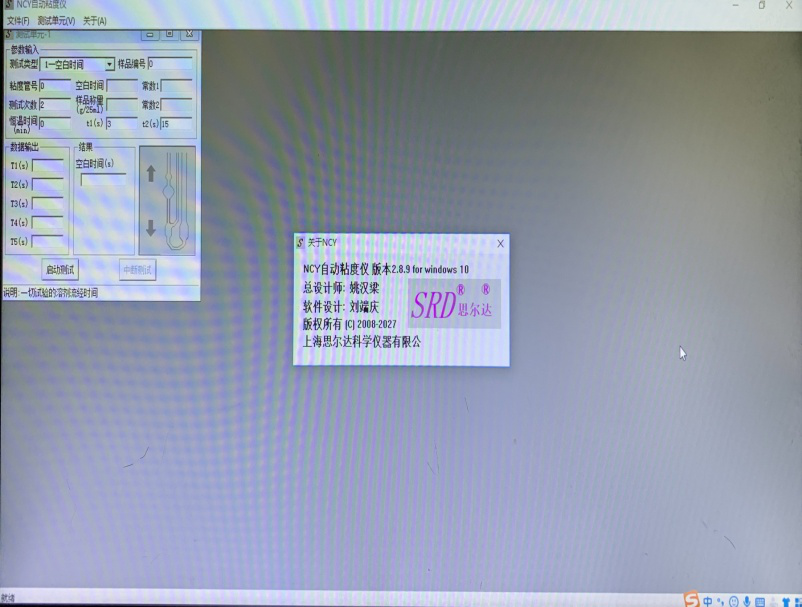
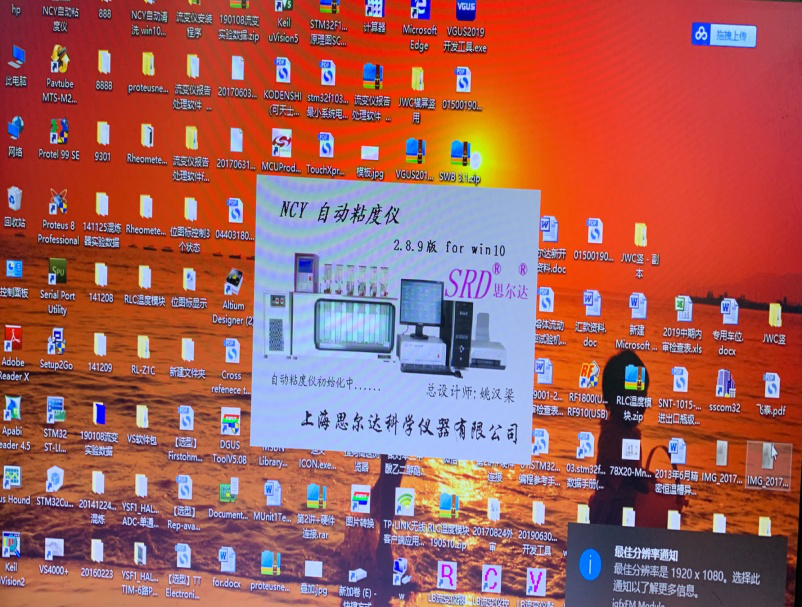
After system initialization, enter the main menu (Figure 4).
If there are previous test data in the instrument database, a detailed data of the most recent saved test will also be displayed alongside the main menu.
Select Test Units and Items
Click on the "Test Unit" at the upper left corner, select the test unit number. Click on "Test Unit 1", and the page will display...
"Test Unit-1" data sheet (Figure 5).
Figure 4:
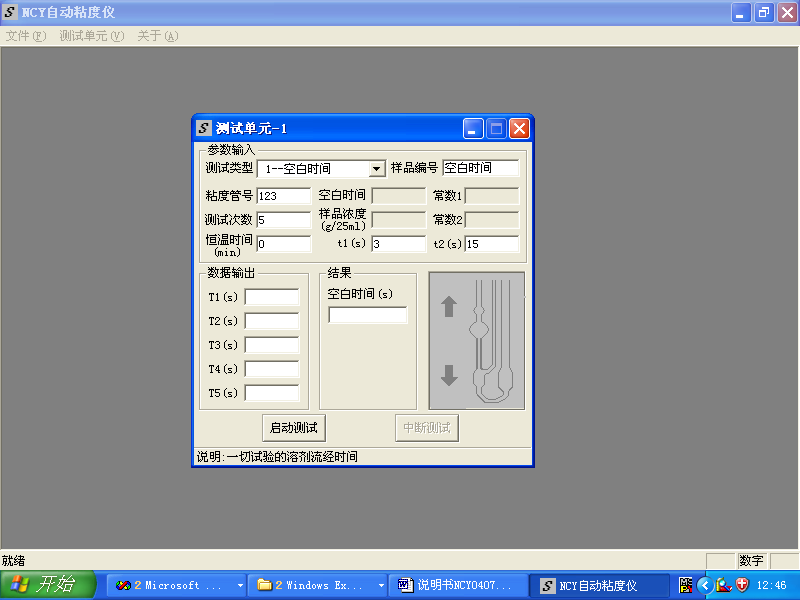
Figure 5:
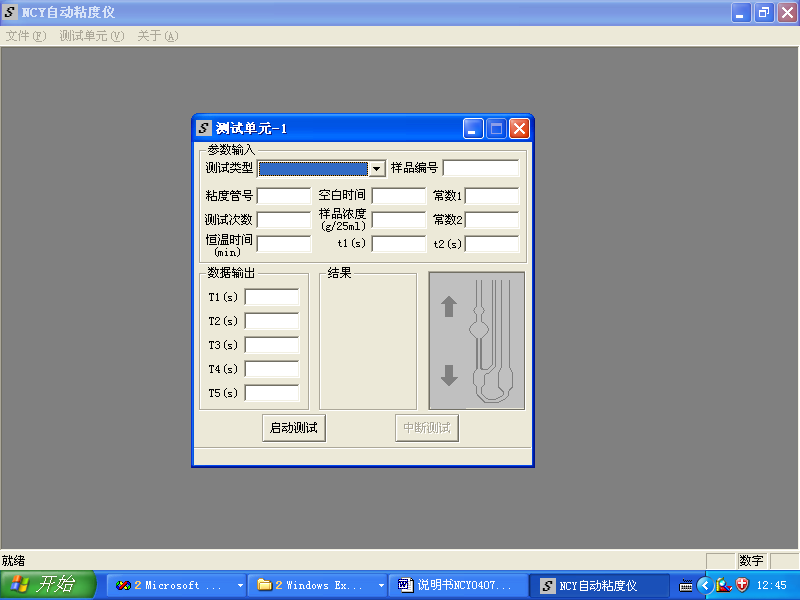
Hover your mouse over the colored rows at the top of the table, hold down the left mouse button to freely move the data table to any position on the screen.
Now select the test type, click the dropdown key for test types, with 25 options available (can be added or removed according to customer requirements), such as:
Blank Time — Time used to measure the solvent flow through the capillary.
Properties Viscosity [N1] - Used to measure the intrinsic viscosity when the solvent ratio is phenol: perchloroethylene = 1:1.
Property Viscosity [N2] — Used to measure the specific viscosity when the solvent ratio is phenol: tetrachloroethane = 3:2.
Click the "Blank Time" to select the test type.
When selecting the test type as "Wash Viscosity Meter," during the test, only the solution aspiration operation is performed without displaying the test results.
3. Set Parameters
Next, set the parameters: the viscosity tube number you are currently using, the sample number being tested, then enter the number of tests = 5, t1 = 3s, t2 = 15s, constant temperature time = 0 (constant temperature time is in minutes; if the sample has already reached a constant temperature, set it to 0). If the constant temperature time is set to 15, after pressing the start test, the instrument will wait for 15 minutes of constant temperature before automatically initiating the test (Figure 6).
4. Initiate testing
Next up, the fun really begins. Would you like to test it now? Sure, just click "Start Test." The system asks you to confirm (Figure 7) – of course, click "Yes."
Figure 6:
Figure 7:
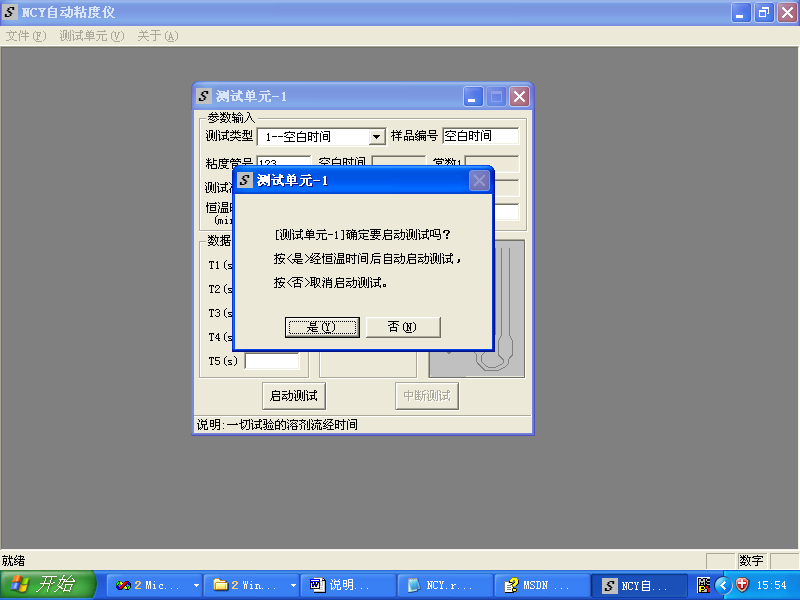
Currently, the system is very busy. Under the action of the air pump and valve, the liquid in the capillary undergoes continuous up and down changes. The simulation image will vividly display the current level changes (Figure 8):
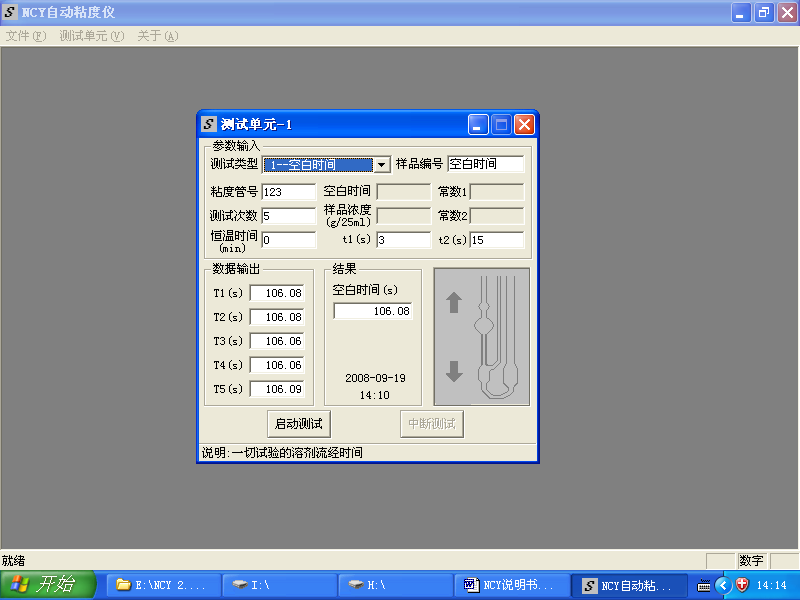
After several runs, the valid data is recorded sequentially in the spaces, and the test results are displayed in the data output and result spaces as shown (Figure 9).
Figure 8:
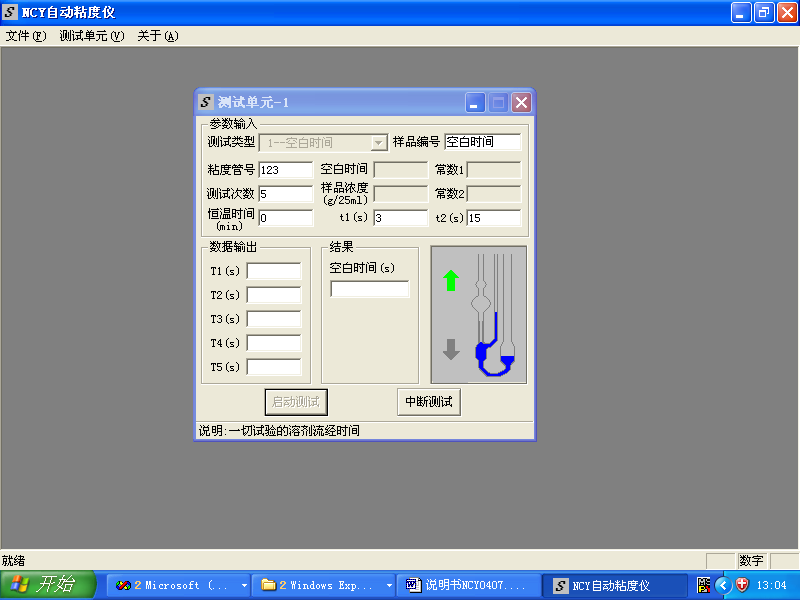
Figure 9:
If the time error of each test exceeds the set value due to issues such as the cleaning of the viscometer, filtration of the solvent (liquid), or problems with temperature control.
When the error threshold is reached, the system will issue a warning. Please check the above issues and then restart the test (Figure 10):
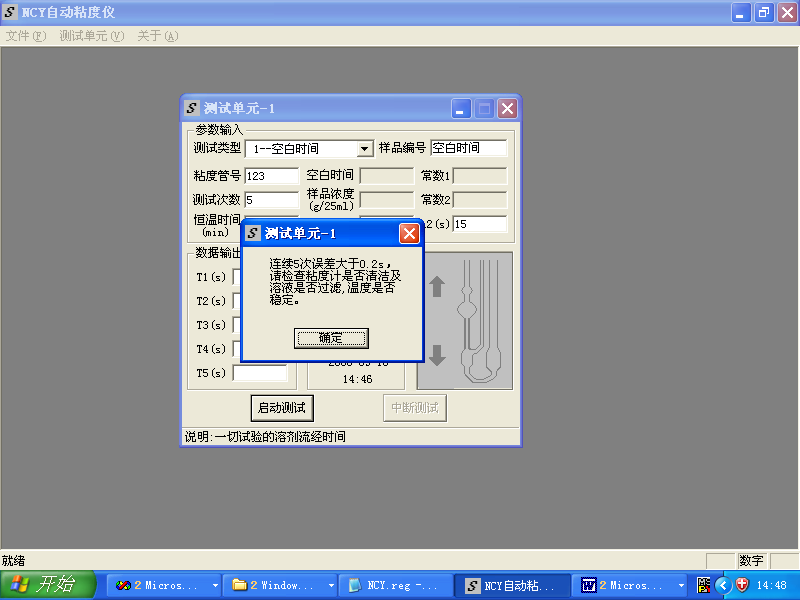
If the test errors from previous attempts are acceptable, but the errors from subsequent tests exceed the set error threshold, then although the results have been calculated in the test unit data table (Figure 11), their validity is still subject to your personal confirmation.
Figure 10:
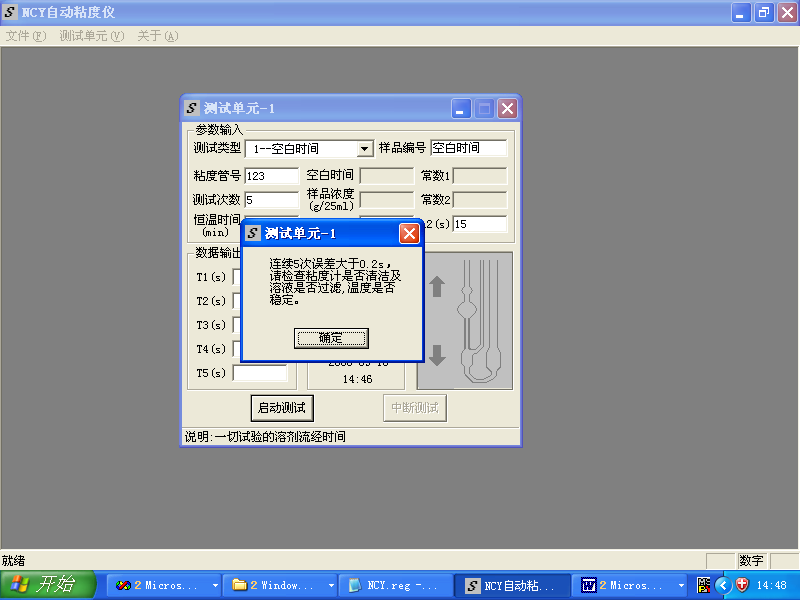
Figure 11:
The test ended smoothly, wasn't it? Now we can print out the entire parameters and results. Don't forget to turn on the printer and prepare some A4 paper.
5. Document Printing
5.1 Direct Printing
Click the "File" menu and then "Print" to open the print dialog box (Figure 12):
Select the number of copies, then click "Confirm." The printer will start up, and a test report will quickly appear.
5.2 Print Preview
Click the "File" menu and select "Print Preview" to view the print preview (Figure 13):
Click "Print" on the interface to enter the print dialog box of Figure 13 for printing.
Figure 12:
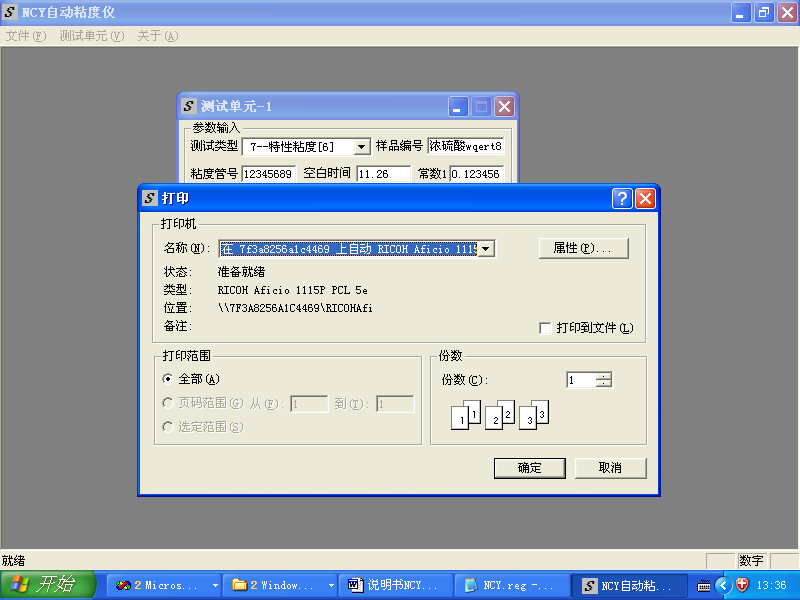
Figure 13:

5.3 Print List
Click the "File" menu and then "Print List" to open the Data Open dialog box (Figure 14):
Hold down the Ctrl key and use the left mouse button to select the data you want to print, up to 25 data items can be selected. Release the Ctrl key after selection, then click.
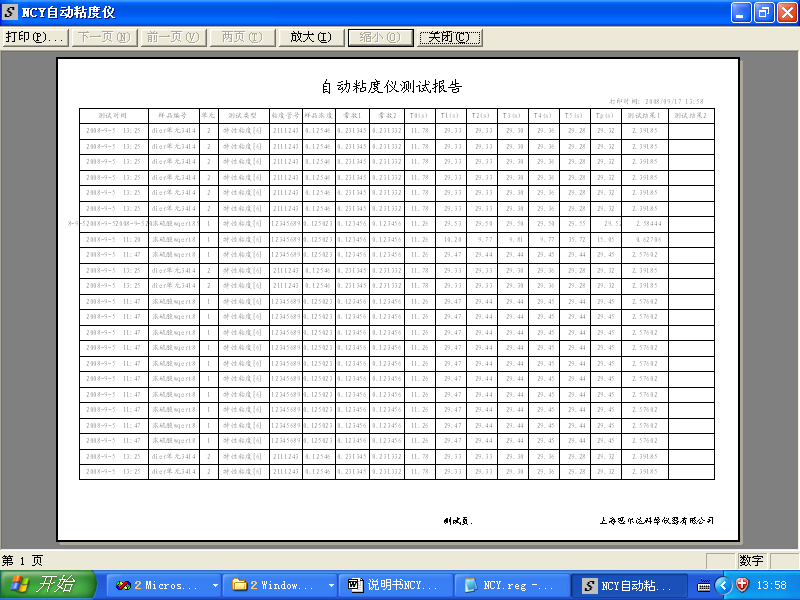
Preview appears (Fig. 15). At this point, click "Print" on the interface to enter the print dialog box shown in Fig. 12 and proceed with printing.
Figure 14:
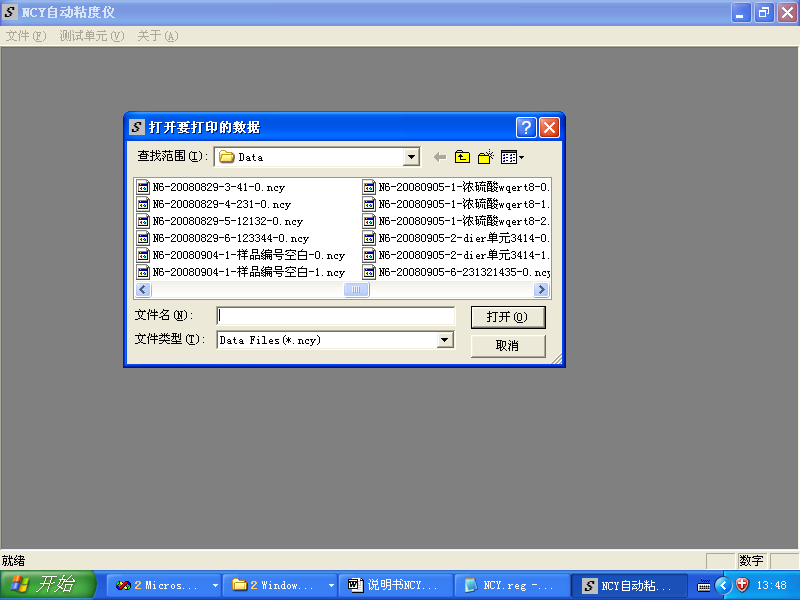
Figure 15:
6. File Save
If you wish to save the above results, click "Save" under the File menu, and a database and filename will pop up. The file will be automatically named according to the following rules:
"Test Type - Year Month Day - Unit No. - Sample No. - Save Sequence No."
Test types such as: B-Blank Test
N1-1: 1:1 solvent ratio
N2-3:2 Ratio Solvent
Of course, you are also welcome to change the file name yourself.
Click "Save."
After saving, select "Open" from the File menu to locate the filename of the file you just saved. If you close the original test unit's data table, click "Open" on the file table, and the data table with the filename will be displayed on the screen.
Detailed Description
1. Open the test unit parameter input data table
There are two ways to open a data table. First, click on "Test Unit" in the main menu and select from the submenu. Second, click "Open" under "File" in the main menu, which will open the database filename. You can choose a file with the same input parameters and open it. This way, you won't need to enter parameters; simply click "Test Start" and confirm to run with preset parameters (original test results will be automatically canceled), or you can run with modified parameters.
2. Data Overview
"Data Overview" under the main menu "Test Unit," which lists multiple groups of data being tested or displayed simultaneously on the screen.
3. Multi-unit printing
To print out multi-unit data that is being tested or displayed on the screen simultaneously, simply click on "Test Unit" and then select "Data Overview." Next, click on "File" and choose "Print."
4. Printout of Viscosity Test Summary Report
When it's necessary to print multiple test results together, follow the following procedure:
4.1 Click "Print List" in the file tab, and a pop-up screen will display the filenames of previously recorded test data (Figure 14).
4.2 Select the file name to print: Hold down the Ctrl key (lower left corner) on the keyboard, then click the mouse to select the file name.
4.3 Click "Open," and the table to be printed will appear on the screen (Figure 15).
4.4 Click "Print" on the screen to enter the print dialog box (Figure 12).
5. Requirements for Parameter Input
Viscosity Tube Number: up to 6 characters
Sample Number: up to 12 characters, 6 Chinese characters
Test Cycles: Refers to the number of valid test cycles, with input options of 3, 4, or 5. For viscosity timing after rinsing, set to 1.
During automatic testing, the first run is a blank operation, and subsequent runs are not considered valid if the error exceeds 0.2 seconds (can be preset).
t1: Typically, a viscometer has two scale lines, t1The time it takes for the liquid level to continue rising after reaching the top (imaginary) marking line during the testing process.1Too long, the liquid may enter the hose due to excessive rise. Too short, it's too close to the upper line; generally, it's best to fill the small bubble above.1Recommended value is 3s (solvent ratio of 1:1).
t2: Refers to the time required after the liquid level drops to the lower line (imaginary) to continue descending, ideally when all the solution above the capillary has flowed to the bottom of the viscometer (otherwise, bubbles may form when drawing the liquid up again the second time).
t2Recommended value is 15 seconds (solvent ratio 1:1).
t1,t2The value depends on the flow rate of the liquid.
During characteristic viscosity measurement, the following parameters need to be input:
Sample weighing: Refers to the amount of sample contained in 25mL of solution, according to standards, generally 0.1250g/25mL.
T0(Blank Time): The time measured when using the same solvent and test unit (including the same Ubbelohde capillary viscometer).
6. Detailed Test Runs
As previously explained, if you select 3, 4, or 5 in the "Test Times" option, the testing process will be:
Upon startup, the first test results are discarded. Compare the second and third tests. If the error is less than the set value (currently 0.2s), the second and third test values are respectively taken as the first and second official test values. Continue testing until the third, fourth, or fifth test is selected, then end the test. Conversely, discard the second test, use the third as the second test, and retest once for comparison. Continue this process until the two tests have an error less than 0.2s (otherwise, exit the dialog box after the fifth test, announcing the end). Then, continue testing until the selected number of tests is reached.
This plan may result in the first two tests meeting the accuracy requirements, but not necessarily within the selected number of valid test attempts. Therefore, a dialog box may occasionally pop up, prompting you to make a decision.
7. Image
The image of the solution flow in the viscometer being tested is displayed in the bottom right of the parameter table.
8. Interruption Test
During the test, it can be interrupted at any time. After clicking the "Interrupt" button, upon your confirmation, the system will revert to the state before the test. If you need to retest, simply click the "Test" button again.
9. File Erasure
Open the database (Main Menu "File", "Open"), click on the filename with the mouse, hold down the left mouse button and drag to the "Recycle Bin," or right-click on the filename to select "Delete."
10. Entry to the Viscosity Measurement System
There are two pathways to enter the viscosity measurement system:
① After powering on, double-click the NCY Automatic Viscosity Meter shortcut on the desktop to enter the testing system.
② Access the NCY Automatic Viscosity Meter by clicking on Programs in the Windows Start menu.
System Recovery from Damage
System damage can be quickly repaired with a disc provided by our company.
Insert the disc, open File Explorer, start the CD drive, can you see the "Installation Instructions" file? Open it, and it will guide you.
Technical Specifications
Temperature Control Range: (10-80)℃ (JWC Series)
Temperature Fluctuation: ±0.01℃ (JWC Series)
Temperature Distribution: ±0.01℃ (JWC Series)
Measurement Range: 0.01s - 999.99s
Repeatability: 0.02s (after excluding the influence of residual impurities in the solution within the viscometer)
Power Source: 220V, 10A, 50Hz
Interface box rated power: 0.1 kW (for other constant-temperature baths and refrigerators, refer to respective manuals)
● Restoration of fiber signal transmission failure
The change in liquid level within the capillary viscometer is detected by fiber optic signals. After the instrument has been used for a while, dirt may accumulate at the fiber optic ends, causing poor signal transmission. The solution (agent) surges up the capillary, forming a fault (determined by the cleanliness and quality of the water in the water tank). At this point, you may notice the green light above the test unit blinking or at least one red signal light does not change as the solution passes through the detection point, and there are no bubbles or suspended particles in the detection area. Generally, this can be determined to be a poor signal transmission, and it can be resolved by gently wiping the ends of two fibers with a "fiber optic cleaner" (located on the right side of the main housing).
Maintain clear and transparent water quality without suspended particles. Using pure water is crucial. Heavy water mineral sediments are highly detrimental. Keeping the water quality clean regularly actually greatly enhances work convenience.
After-Sales Service
Our products are covered by a one-year free warranty, while the NCY series (2-digit, 4-digit, 6-digit) viscometers come with a two-year free warranty and lifetime repair service. Please contact us promptly if any issues arise, and you can be assured of satisfactory service. Should there be any changes, you can easily find us online, by calling the information hotline at 021-114, or through the Shanghai Yellow Pages.
Thank you for reading this manual.
Welcome to use the NCY Automatic Viscosity Meter
We will provide free version upgrade services to our users.

Phone Consultation