Automatic melt flow rate (MFR) measurement (Method A, Method B)
Automatic determination of melt volume flow rate (MVR)
Automatic determination of melt density ρ
Determine the Melt Flow Rate Ratio (FRR)
RL-Z1B1–Especially suitable for measuring the melt flow index of fluoroplastic
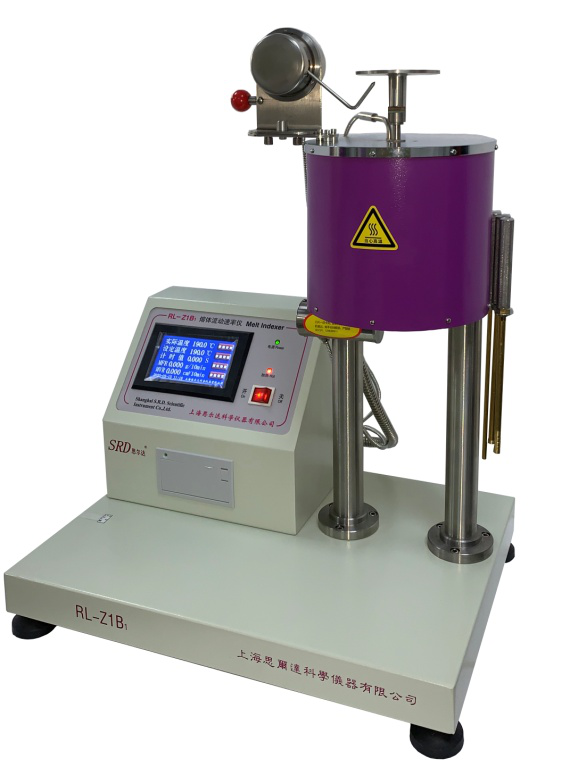
RL-Z1B1,RL-Z1B1–
Melt Flow Rate Meter User Manual
(2019.07 Edition)
Automatic and Manual Melt Flow Rate (MFR) Measurement
Automatic determination of melt volume flow rate (MVR)
Automatic melt density measurement ρ
Determination of Melt Flow Rate (MFR) compared to FRR
Melt Flow Rate (MFR) Tester, also known as the Melt Index Tester, is a specialized instrument used to measure the melt flow rate of thermoplastic materials under specific conditions. The melt flow rate (melt index) of thermoplastic materials refers to the mass or volume of melt that passes through a standard die capillary tube every 10 minutes at a certain temperature and load, represented by the MFR (MI) or MVR value. It distinguishes the viscoelastic properties of thermoplastic materials in the molten state. Ensuring the quality of raw materials, products, and other items for thermoplastic materials and synthetic fibers is of great significance. This machine boasts high temperature control accuracy, nitriding treatment of critical parts for enhanced strength and hardness with minimal deformation, which provides excellent conditions for precise flow rate measurement. RL-Z1B1–The barrels, piston rods, molds, and related components are made of special materials used in aviation engines, offering excellent corrosion resistance and even suitable for testing materials like F46 (polymer of tetrafluoroethylene and hexafluoropropene).
Various countries have set corresponding specifications for the accuracy of test temperature, with ASTM at ±0.2°C, ISO at ±0.5°C, JIS at ±0.2°C, and China at ±0.5°C.
This instrument meets the technical specifications set by ISO 1133:1997(E), ASTM D1238-95, JIS K72A, and other relevant standards, including China's national standards GB 3682-2000, JB/T 5456, JJG 878, and others.
RL-Z1B1The melt flow rate meter is further improved in structure based on the RL-Z1B model.
I. Main Technical Parameters
Temperature Control
Range: 100 – 400℃
Accuracy: Not worse than ±0.2℃ (within 125℃ to 300℃)
International standard ISO 1133, GB 3682 specified test temperatures: 125, 150, 190, 200, 220, 230, 250, 265, 275, 280, 300°C
Fluctuation not worse than ±0.1℃ (as per National Verification Procedure JJG878, not exceeding ±0.5℃)
8h Bleach Shift ≤0.1℃ (As per the National Inspection Regulation JJG878, the shift within 4 hours should not exceed ±0.5℃)
Distribution ≤0.5℃ (as per National Inspection Regulation JJG878, not to exceed 1℃)
Resolution: 0.1℃
Error Correction Random
2. Recovery time of barrel temperature after addition ≤4min
3. Timing Clock
Range: 0~9.999s~999.9s~9999s
Resolution: 0.001s/0.1s/1s
Cutting Equipment
4.1 Automatic Cutting Device Cutting: Timed Cutting 0-999s
Electric Cutting
4.2 Manual Cutting:
5. Molding Inner Diameter: Φ2.09 ± 0.005mm
6. I.D. of Material Tube: Φ9.550±0.020mm
7. Load:
Accuracy: Not less than ±0.5%
Combined Load:
325g, 1200g, 3800g, 5000g, 10000g, 12500g, 21600g (fully equipped according to ISO 1133, GB 3682)
8. National Standard Sample (PE)
Test:
Repeatability Precision ≤2% (as per National Verification Regulation JG828, not exceeding 8%)
Accuracy: ≤5% (as per National Verification Regulation JJG828, not exceeding ±10%)
9. Measurement Range: 0.02~2000g/10min (during automatic testing)
0.03~2000cm3/10min (Auto-test mode)
*Guaranteed no material leakage during the preheating and constant temperature phase.
During manual cutting tests, human response speed has a significant impact on high flow rate values.
10. Power Supply: 220V, AC, 50Hz, 6A
11. Dimensions: 1×b×h = 520×380×685mm3
12·Weight: Main unit 30.5Kg, weight box 25Kg
13·Rated Power 0.75 kW
II. Main Structure
This instrument is primarily composed of five major parts: a computer system, a detection device, a load, an automatic testing mechanism, and an electric cutting device.
1. Detection Device (Illustration 1)
1.1 Material Tube*
Material: Nitrided steel, treated with nitriding process, HV≥700.
1.2 Material Rod (Piston Rod)*
Utilizing nitrided steel material and processed by nitriding, with an HV of ≥600. The rod head is uniformly smaller than the cylinder inner diameter by 0.075±0.015mm. A thermal insulating sleeve is fitted at the top to insulate the rod from the load. There are two reference lines spaced 30mm apart on the rod. Their positions are: when the lower edge of the rod head is 20mm from the mold top, the upper marking line is level with the cylinder mouth (see Figure 2).
1.3 Mold*
Φ2.095±0.005mm,HV≥700。
*RL-Z1B1–Corrosion-resistant, made from special materials used in the production of aircraft engines.
2. Computer System
2.1 Temperature Control System
This system utilizes a platinum resistance as a temperature sensor, forming a precise temperature measurement bridge with precision resistors. It adjusts the heater's power output using computer software and automatically compensates for fluctuations in power supply voltage and the impact of ambient temperature on temperature control.
2.2 Timing and Automatic Testing Agencies
The computer timing system on this unit features both manual and automatic timing (automatic operation) modes.
2.2.1 Automatic timing (automatic operation) overcomes the differences in reaction speed among operators from observing the timer to executing actions, and is extremely convenient. The machine is equipped with an automatic testing mechanism that detects the movement distance of the material rod using infrared rays, thereby determining the time required to move the material rod down 1", 1/4", or 1/8" in distance.
The melt density is tested, followed by the travel time test, at which point the flow rate value is displayed and printed.
2.2.2 Manual timing; its method is equivalent to the stopwatch function.
2.2.3 Built-in perpetual calendar.
3. Load
The load is the combined mass of the weight and beam assembly. The mass of the weights and the corresponding test loads are listed in Table 2:
| Weight (g) | Assorted (g) |
| 325 | T-Weight + Rod Assembly |
| 1200 | 325+875 |
| 2160 | 325+1835 |
| 3800 | 325+3475 |
| 5000 | 325+4675 |
| 10000 | 325+1450+1835+6390 |
| 12500 | 325+3475+4025+4675 |
| 21600 | 325+875+1835+3475+4025+4675+6390 |
The quality of the rod assembly does not include the quality of the guide sleeve.
4. Automatic Cutting Device
The automatic cutting device consists of a motor, a reducer, and blades, controlled by a computer, mounted at the bottom of the barrel. It is compact in size and operates with agility.
III. Working Conditions
1. Environmental Temperature: 10-35℃; (This instrument automatically enters a protective state in environments below 1℃.)
Relative humidity ≤ 80%
Horizontally placed, solid foundation, no vibration.
No strong air convection, no corrosive gases, and no strong magnetic field interference.
IV. Preparations and Parameter Selection
1. Instrument placement
1.1 Place the instrument on a stable workbench, position the level on the cylinder platform, and adjust the bottom bolts (i.e., the feet) until the level is level.
1.2 Remove the attachments: cleaning rod, pressure rod, mold cylinder, and mold cleaning rod from the attachment, and place them upright on the attachment rack on the right side of the instrument.
1.3 Insert the mold and material rod into the hopper (pre-installed in the hopper at the factory).
1.4 Insert the instrument's power plug into the power source, ensuring the power supply has reliable grounding and leakage protection, and provides sufficient current.
2. Sample Preparation
The sample shape can be granular, flake, thin film, fragments, etc., or powdered. Prior to testing, dehumidification and drying treatment should be conducted according to the plastic type requirements. When serious irregularly scattered phenomena appear in the test data, consider whether the instability of the sample properties requires the addition of a stabilizer (especially for powdered materials).
Based on the expected melt flow rate of the sample, weigh the sample according to the amount specified in the table (for reference only). For experiments with national standard samples, follow the instructions provided for the standard sample:
Melt Flow Rate (MFR) | Sample Addition Amount (g) | |||
g/10min | ISO Standards | GB Standard | ASTM Method | JIS Standard |
0.1-0.5 | 3-5 | 3-5 | 2.5–3 | 3—5 |
>0.5-1 | 4-6 | 4-6 | 3—5 | |
>1-3.5 | 4-6 | 4-6 | 3—5 | 3—5 |
>3.5-10 | 6-8 | 6-8 | 5—8 | 5—8 |
>10—25 | 6-8 | 6-8 | 4—8 | 5-8 |
>25 | ||||
Note: If the material's density is greater than 1.0g/cm³, it may be necessary to increase the sample quantity.
3. Test Conditions Selection
The National Standard GB/T3682-2000 specifies the test conditions explicitly through Appendices A and B. The Φ1.180 die specification mentioned in the old standard no longer appears in the current standard.
Appendix A Appendices B
(Standard Appendix) (Noted Appendix)
Test Conditions for Measuring Melt Flow Rate Test Conditions for Thermoplastic Materials
All test conditions shall be specified by the corresponding material naming or specification standards. Table B1 lists the test conditions that have been specified in the relevant standards. If necessary, ...
Column A1 lists the proven applicable test conditions. For certain special materials, other test conditions not listed may be used.
Table A1 Table B1
Conditions (Letter Codes) | Test Temperature θ, °C | Rated Load (Combination) m nom,kg | Material | Terms (Letter Code) | Test Temperatureθ ℃ | Nominal Load (Combination) m nom,kg | |
A | 250 | 2.16 | PS | H | 200 | 5.00 | |
B | 150 | 2.16 | PE | D | 190 | 2.16 | |
D | 190 | 2.16 | PE | E | 190 | 0.325 | |
E | 190 | 0.325 | PE | G | 190 | 21.60 | |
F | 190 | 10.00 | PE | T | 190 | 5.00 | |
G | 190 | 21.6 | PP | M | 230 | 2.16 | |
H | 200 | 5.00 | ABS | U | 220 | 10.00 | |
M | 230 | 2.16 | PS-1 | H | 200 | 5.00 | |
N | 230 | 3.80 | E/VAC | B | 150 | 2.16 | |
S | 280 | 2.16 | E/VAC | D | 190 | 2.16 | |
T | 190 | 5.00 | E/VAC | Z | 125 | 0.325 | |
U | 220 | 10.00 | SAN | U | 220 | 10.00 | |
W | 300 | 1.20 | ASA、ACS、AES | U | 220 | 10.00 | |
Z | 125 | 0.325 | |||||
Note: If future testing conditions not listed in this table are required, such as for new thermoplastic materials, only the loads and temperatures used in this table may be selected. | PC | W | 300 | 1.20 | |||
PMMA | N | 230 | 3.80 | ||||
PB | D | 190 | 2.16 | ||||
PB | F | 190 | 10.00 | ||||
POM | D | 190 | 2.16 | ||||
MABS | U | 220 | 10.00 | ||||
4. Cutting Time Selection
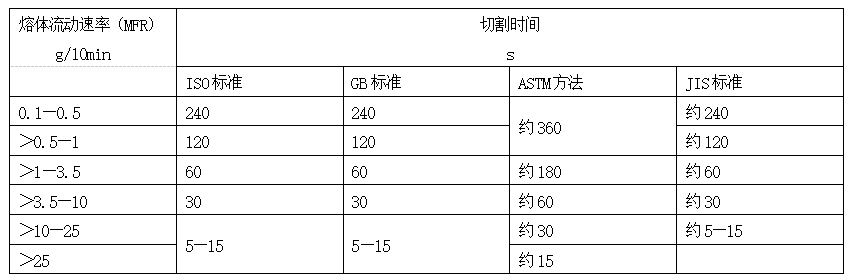
When testing by the cutting and weighing method, whether automatic or manual cutting, it is necessary to anticipate the interval time for required cutting strips. A too short interval results in small strip quality, with increased impacts from weighing and cutting errors. The interval time should also not be too long; first, the mass of the sample within the effective segment of the rod (i.e., between the second lines) is limited, and secondly, we also hope to obtain more than two strips for parallel comparison at the same time.
5. Mobile Route Selection
The automatic test function calculates the mass of the material flowing out based on the lowering distance of the feed rod (i.e., stroke) and the density of the melt in the hopper. Within this instrument, three feed rod stroke settings are available: 1” (25.4mm), 1/4” (6.35mm), and 1/8” (3.175mm). It is recommended to select the stroke according to the expected material flow rate (MFR) as shown in the table below:
| MFR(g/10minn) | Stroke Length (mm) |
| 0.01~0.5 | 3.175(1/8”) |
| 0.5~10 | 6.35(1/4”) |
| >10 | 25.4(1”) |
V. Test Melt Flow Rate (MFR) Using the Cutting-Weight Method
The Cutting-Weight Method is the most basic technique, which directly follows the procedures described in the standard (referred to as Method A in the national standard GB3682-2000). Its fundamental principle is: cut a segment of molten material flowing from the die bottom, with the flow time of this segment being known. Weigh the molten material and convert it to the flow rate over 10 minutes, which is the Melt Flow Rate (MFR, also known as MI) of the material, with units of g/10min.
When using the cutting weighing method, first lower the automatic test needle rod all the way down.
Select Temperature, Load
Based on the test material, the combination of test conditions, i.e., the test temperature and the nominal load, is obtained from Article 3 of Chapter 4. Some materials have multiple combinations of test conditions, which can be determined according to the agreed standards or the company's own standards. For materials with additives in the base material, the base material is used for determination. For new materials not listed in the standard appendices, as per GB3682, the test conditions for these new materials can only be selected from the loads and temperatures used in the appendices.
2. Set temperature
See Section 2.2 of Chapter 10.
Additive
Connect the instrument and turn on the power, set the specified temperature, insert the mouth mold and material rod. Generally, after 20-30 minutes, the temperature will stabilize. Place a certain amount of material in the feeder for use.
Once the temperature stabilizes, add the material.
Remove the rod, place it on a high-temperature-resistant object, and avoid collision of the rod's head with other hard objects.
b. Insert the hopper into the cylinder (try to avoid contact with the cylinder wall to prevent overheating and sticking), then slowly pour the material into the hopper using the feeder, while shaking the hopper to allow the material to fall quickly.
c. Once the material is added, use the pressure rod to compact it (while expelling as many bubbles as possible). Be cautious not to use the material rod (piston rod, for testing purposes) to tighten the material, as both the rod and the cylinder are very hard, which may cause damage. The pressure rod is made of copper and will not harm the cylinder.
d. Insert the material rod and place the weight pan over it (usually no need to apply weight to prevent rapid material loss). When inserting the material rod, ensure the positioning sleeve on the rod fits into the cylinder to prevent the rod from tilting.
The steps a-d should be completed within one minute to ensure the recovery time of temperature and the accuracy of test data. After a temperature adjustment of 4-6 minutes, the temperature will return to the preset temperature (within ±0.2℃ of the set temperature), at which point you can proceed with the following testing procedures.
4. Automatic Cutting Test
4.1 Set the cutting interval time and number of cuts according to the cutting time selected under Article 4 of Chapter IV; see details in Article 2.7 of Chapter X.
4.2 Add weights (can also be added immediately after adding materials, depending on the material's characteristics), and quickly lower the material rod to the first marking line. If it cannot be quickly lowered, apply an external force to the weights (note: apply force vertically, not horizontally to avoid damaging the rod), allowing for quick lowering. Alternatively, you can add the weights in advance during the next test.
4.3 When the material rod is about to move down to the lower marking line, activate the automatic cutting function (refer to Chapter 10, Section 2.4), and the automatic cutting device will cut sample strips individually by time intervals.
When using the cutting blade, if the gap between the blade edge and the mold outlet is too large, it may cause the sample strips to be uneven or sticky; if the gap is too small to the point of getting stuck, it will not operate normally. At this point, adjust the gap between the blade and the outlet.
Loosen the two fixing screws of the blade and adjust the blade to its optimal position.
5. Hand-cut
In cases where certain materials may not be conveniently cut automatically due to issues like sticking, manual cutting can be tried. A wooden-handled cutting knife is provided in the drawer at the bottom of the instrument, specifically for this purpose. It's widely used internationally.
When cutting, simply hold the wooden handle with your right hand and insert the curved blade tip from the bottom of the cylinder to the mouth by pushing it to the left.
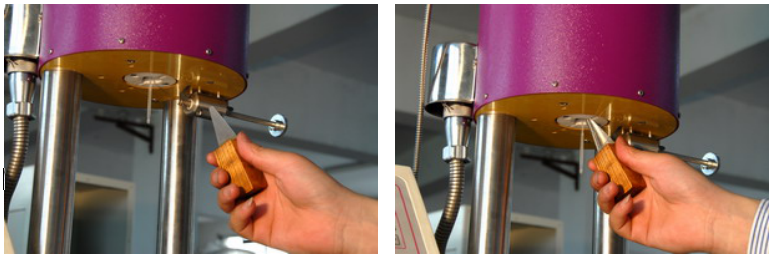
During hand cutting, the computer timer is used as a stopwatch (refer to Chapter 10, Section 1.12).
6. Weight Calculation
a. Discard strips with visible bubbles, and weigh each retained strip (at least three, preferably) individually, with accuracy to 0.0001g, to calculate their average weight. If the difference between the maximum and minimum weight of individual samples taken at the same time interval exceeds 10% of the average weight, a retest should be conducted.
b. Calculation Results
Melt Flow Rate (MFR, MI) is expressed as the mass of melt extruded per 10 minutes (g).

Equation: MFR——Melt Flow Rate (g/10min)
m - average bar quality (g)
t - Cut Time Interval (s)
6. Automatic melt flow rate testing (Mass Flow Rate MFR, Volume Flow Rate MVR)*Operation method for )
The method of automatic testing is derived from the basic cutting and weighing method, and is now included in the new standard (GB3682-2000, Method B). Its basic principle is:
With the known displacement of the rod and the volume of melt流出,and with the known melt density of the material, the mass of the material flowing out is determined. By automatically measuring the time taken to flow the mass with the instrument, the melt flow rate (MFR) of the material can be calculated.
Select temperature, load, and stroke
Based on the tested material, the combination of test conditions, i.e., test temperature and test nominal load, is found in Chapter 4, Article 3. Some materials have multiple combinations of test conditions, which can be determined according to agreed standards or proprietary ones. For materials with additives in the base material, the base material determines the conditions. Those that are new materials, not listed in the standard appendices, according to GB3682, the test conditions for these new materials can only be selected from the loads and temperatures already used in the appendices. For the selection of stroke, please refer to Chapter 4, Article 5.
Set Temperature
See Article 10, Section 2.2.
Set Other Parameters
3.1 Melt Density Setting
Material density in a molten state at a specific temperature (g/cm³)3It is a necessary condition to ensure the automatic testing of melt flow rate, which is unrelated to melt density if only the volume flow rate is tested.
The following are the melt densities of two materials that have been published in both the International Standard (ISO) and the American Standard (ASTM); these densities are constant at specific temperatures and are unrelated to the density at room temperature:
ρPE(190℃)=0.764g/cm3
ρPP(230℃)=0.739g/cm3
If the material is not as stated above, or if any additives or fillers have been mixed with the stated materials, the melt density of the material should be confirmed before testing. The melt density can also be tested using this equipment; see Chapter 7 for details.
3.2 Itinerary Setup
See Section 10, Article 2.6. This is a mandatory item that can be selected in 1" (25.4mm), 1/4" (6.35mm), or 1/8" (3.175mm).
3.3 Sample Number Setting
See Section 10, Article 2.7. This is a default setting option, intended for printing purposes only.
3.4 Load Settings
See Section 10, Article 2.7. The numerical setting for the load is not related to the actual load applied. To ensure consistency between print parameters and the actual situation, the numerical setting must match the actual load. This is also the default setting, intended for use during printing only.
3.5 Date Setting
The date is already set at the factory, usually no further adjustment is needed. If adjustment is required, please refer to Chapter 10, Section 2.1.
4. Additive
Connect the instrument and turn on the power, set the specified temperature, insert the mouth mold and material rod, and generally after 20-30 minutes, the temperature will stabilize. Place a certain amount of material in the feeder for use.
After temperature stabilization, add material:
Remove the material rod and place it on a high-temperature-resistant object, avoiding collision of the rod's tip with any hard objects.
b. Insert the hopper into the cylinder (try to avoid contact with the cylinder wall to prevent overheating and sticking), then use the feeder to pour the material slowly into the hopper, while vibrating the hopper to allow the material to fall quickly.
c. Once filling is complete, use the pressure rod to compact the material (while expelling as many bubbles as possible). Be cautious not to use the material rod (piston rod, for testing) to tighten the material, as both the rod and cylinder are very hard, which could cause damage. The pressure rod is made of copper and will not harm the cylinder.
d. Insert the material rod, and place the weight pan on top (usually no weights are applied at this point to prevent material loss). When inserting the rod, ensure the positioning sleeve on the rod fits into the cylinder to prevent the rod from being crooked.
The steps a-d should be completed within one minute to ensure temperature recovery time and accuracy of the test data. After a 4-6 minute temperature adjustment, it will return to the preset temperature (within ±0.2℃ of the set temperature), at which point you can proceed with the following testing procedures.
5. Automatic Testing
5.1 Raise the pin rod of the travel device to its highest position and add the weights.
5.2 Click "Test Function," then select "Automatic Test." After that, click "Start." The automatic test will be activated, and the instrument will enter automatic test mode (refer to Chapter 10, Section 2.3). Once the instrument is in automatic test mode, you will not be able to modify other set parameters, including default parameters. If changes are needed, you must click the "Interrupt Test" button.
5.3 As the weight moves down, the bottom of the weight slightly presses the plunger, and when the lowest line on the material rod (piston rod) reaches the automatic test starting position, the instrument automatically begins the timing test. If the material rod cannot quickly descend...diyiGroove lines are present for applying external force to the weight (note: apply force vertically, not horizontally to avoid damaging the beam), allowing for quick descent. Additionally, the weight can be pre-added during the next test.
5.4 Upon completion of the journey and testing, the instrument automatically calculates the results, displaying both the quality and volume flow rates (MFR, MVR) simultaneously on the screen and printing them out.
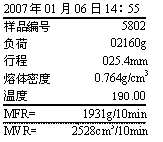
Section 7: Automatic Testing of Material Density in Melt State*Operation Method for Melt Density
The principle of testing the density of material in a molten state is to measure the mass of the melt within a certain volume.
Select and set the temperature
The selection and setting of the temperature are consistent with that during the melt flow rate test.
Select and set the itinerary
See Section 2.6 of Chapter 10, generally speaking, the duration of the itinerary is planned to be longer.
3. Select Load
Here, there are no special requirements for the selection of loads; you may also refer to Article 3 of Chapter 4.
4. Additives
Refer to Article 4 of Chapter 6
5. Testing
5.1 Lift the top rod of the travel device and add weights.
5.2 Click "Test Function," then "Density Test." Click "Start" afterwards, and you will enter the molten density testing state.
5.3 As the weight is lowered, the bottom of the weight will slightly depress the plunger, and when the lowest line on the material rod (piston rod) reaches the starting position for automatic testing, the automatic cutting blade will automatically make a cut to remove the previously extruded material. Once the material rod has completed its downward travel, the automatic cutting blade will make another cut; the material cut this time will be reserved for use.
If the material rod cannot be issued quicklydiyiGroove lines are available for applying external force to the weight (note: apply force vertically, not horizontally, to prevent damage to the material rod), allowing for quick downward movement.
5.4 Conduct at least three repetitions of the test, obtaining at least three specimens.
5.5 Weigh the cut samples.jingqueDown to 0.0001g.
5.6 Calculate the melt density of the material according to the formula:
ρ=14·m/L(g/cm3)
Equation: m — average quality of the spline (g)
L - Length (25.4, 6.35, or 3.175mm)
8. Determination and Calculation of the Molten Flow Rate Ratio (FRR)*
The melt flow rate ratio, typically used to represent rheological properties, is calculated as the ratio of melt mass flow rate or melt volume flow rate measured under two different test conditions.
FRR=MFR(t,m1)/MFR(t,m2)
Or FRR = MVR(t, m1) / MVR(t, m2)
Refer to Chapter 5 and 6 of this book for the determination of MFR and MVR.
Section 9: Cleaning
After each test, apply pressure above the weights to quickly extrude the excess material. Then, remove the material rod, and clean it hot with a clean cloth. Next, add material to the upper feeding mouth of the cylinder.
Clean gauze (approximately 50×50mm, two layers), press the cleaning rod against the gauze and insert it into the inner wall of the material cylinder, rotate and pull repeatedly, then use the mold top rod to push the mold out of the cylinder from bottom to top, and clean the mold's inside and outside with the mold cleaning rod and gauze.
For materials that are difficult to clean, apply some lubricant, such as silicone oil, decamethylbenzene, or paraffin, while hot, to the areas needing cleaning (inside the barrel, inside and outside the mold, and the material rod). If necessary, using a mineral candle is also acceptable, making the cleaning process much easier.
Ten. Overview of Test Function and Parameter Settings
1. Introduction to Test Functions and Parameter Settings
1.1 Automated Testing
The automatic test measures the downward distance (i.e., stroke) of the pre-set material rod using infrared detection, automatically records the descent time, and calculates the MFR and MVR. The results are displayed on the screen and simultaneously printed out by a miniature printer.
1.2 Auto-Cutting
After initiating automatic cutting, the cutting device automatically cuts strips at set time intervals until the specified number of cuts is reached, at which point the cutting device stops cutting. Cutting can also be interrupted during the process.
1.3 Density Test
See Chapter 7.
1.4 Print Preview
After launch, click "Print" to re-print the previous test results.
1.5 Trip
Available in three stroke lengths for setup: 1" (25.4mm), 1/4" (6.35mm), and 1/8" (3.175mm). During automatic setup, the infrared detection sensor automatically records the time taken for the sample to move this distance, to calculate the automatic test results.
1.6 Sample Number
The digital number of the sample can have up to 4 digits and may be omitted.
1.7 Load
Total mass of the added weights during the sample testing (unit: g, including the material rod assembly).
1.8 Melt Density
Material density in the molten state at the corresponding temperature (unit: g/cm³)3It is a necessary condition for the automatic testing of the melt flow rate to ensure melt quality.
1.9 Cut Timing
During automatic cutting, select the cutting interval time (0-999s).
1.10 Cutting Cycles
During automatic cutting, select the number of cuts (0-99 times).
1.11 Temperature Adjustment
The temperature correction values corresponding to the set temperature points, for use in temperature calibration, with specific methods detailed in Chapter Eleven on temperature error correction.
1.12 Timer
During manual operation, the computer timer is used as a stopwatch: Click the manual timing button to reset and start the timer, and click the "Stop" button to pause the timing.
1.13 Automatic (Test Cutting)
Enable this to perform tests for clauses 1.1 and 1.2 of this article simultaneously.
2. Parameter verification, setup
When setting parameters, click the parameter number display to pop up the keyboard, enter the data, and press "OK" to complete the setup.
2.1 Set Year, Month, Day, Weekday, and Clock
Click the clock number at the bottom left of the screen, the keyboard will pop up on the display. Enter the correct time and press "OK."
2.2 Set Temperature
Click on the original set temperature value, a keyboard will pop up. Enter the temperature value you wish to set and then press "OK."
2.3 Automatic Test Start and Stop
Launch: Click the "Test Function" button, then click the "Launch" button behind "Auto Test" to initiate the automatic test.
Note: To modify any parameters or make other settings, you must first interrupt the automatic test after the automated testing has been initiated.
Close: Click "Interrupt Test" then click "Confirm Interrupt," the automatic test will stop.
2.4 Automatic Cutting Start and Stop
Initiate: Click the "Test Function" button, then click the "Start" button after "Automatic Cutting," and the automatic cutting will begin.
Close: Click "Interrupt Test" then click "Interrupt Test" again for automatic cutting and shutdown.
2.5 Density Test, Automatic (Test Cutting) On and Off
Same as the settings for automatic start and stop, just click the "Start" button on the action for the item you want to start. To stop, click "Interrupt Test" followed by "Confirm Interruption."
2.6 Trip Arrangement
Click "Parameter Settings," then click the number behind the journey. The display will pop up a keyboard. Set the journey value (can only be 3.175, 6.35, or 25.4) and press "OK."
2.7 Sample Number, Load, Melt Density, Cutting Time, Number of Cuts, Temperature Compensation Settings
The setup method is the same as the itinerary setup. To modify an item, click on the number in the row it's located, then input the number on the pop-up keypad and press "OK."
Eleven. Temperature Error Correction
Measurement of the existing temperature error
Temperature is referenced to a standard mercury thermometer, which can be adjusted randomly (thermometer is sold separately). The machine can provide 11 types of specialized calibration thermometers in 10 specifications: 125, 150, 190, 200, 220, 230, 250, 265, 275, 280, and 300°C (inclusive of various domestic and international testing standards). Place the 10mm pad included in the machine above the mold in the extruder, then insert the thermometer so that the bottom of the mercury bulb touches (if the mercury in the thermometer breaks and cannot be restored by shaking, place the thermometer in the freezer for a few minutes until the mercury retracts), and tightly seal the gap above with gauze. Turn on the machine, heat up, and wait for the temperature to stabilize. The difference between the actual temperature value displayed by the instrument and the value read from the mercury thermometer (including its correction value) is the current temperature error. For example, if the instrument displays the barrel temperature as 190°C and the standard temperature of the mercury thermometer (including the correction value) is 190.25°C, then the temperature display deviation is -0.25°C. If using a different mercury thermometer for calibration, the diameter correction must be considered.
*1 Standard procedure requires adding a sample to the barrel, melting it, then inserting a thermometer, keeping its bottom 10mm above the mold opening, with the melt at least covering the entire mercury bulb. This is quite cumbersome. A simpler method is to use a 10mm-high F4 material (suitable for temperatures below 250℃), placing it between the thermometer and the mold. Secure the thermometer's neck to the barrel's top with cloth or similar material to insulate. While this method deviates from the standard, the error is minimal and the process is more straightforward.
*2 The specialized thermometers (supplied separately) provided by our company do not require a dew point calibration. This unit can provide 125, 150, 190, 200, 220, 230, 250, 265, 275,
280, 300℃ thermometers in 11 different specifications, each with a range of only 2℃, covering all test parameters of ISO and GB.
*3 The unit is randomly provided with two specialized thermometers. In the absence of any other instructions from the user, they are set at 189-191°C and 229-231°C respectively.
2. Correction
The unit undergoes full system temperature linear error calibration at the factory. At any point within the range of 125℃ to 300℃, the standard error is no worse than ±0.2℃, with a maximum correction capability of ±9.99℃. After the instrument has been in use for a period of time, the temperature display may drift. In this case, it is necessary to calibrate the temperature display system. To do so, please follow the following procedure:
2.1 As per Clause 1 of the aforementioned section of this chapter, determine the temperature deviation.
2.2 Add the confirmed temperature deviation to the originally entered correction value to obtain a new correction value. For instance, if the original correction value was +0.10℃ and the confirmed temperature deviation is now -0.25℃,the new correction value to input into the computer would be +0.10℃ - 0.25℃ = -0.15℃。
2.3 Amend temperature correction values according to Article 10, Section 2.7, modify the correction value rows.diyiThe position is for the sign bit, which must be entered with either a "+" or "-" symbol.
2.4 The unit has a total of 12 correction points capacity, with 11 already set, leaving one empty slot. Users can set it themselves if needed (method as above).
Twelve. Safety Matters
Regularly inspect the integrity of electrical grounding.
2. Always wear gloves during operation and cleaning to prevent burns.