
USB, RS232, and RS422/485 are the primary communication interfaces, widely used in on-site debugging and equipment connection.
(1) Proper Usage of USB Communication
Communication Cables: Please use cables with reliable shielding and magnetic rings to prevent electromagnetic or noise interference.
Connect: Avoid plugging or unplugging USB cables during communication, and prevent direct contact with the metal surface of the USB port to prevent static electricity.
③ Incorrectly connecting the USB may cause the following issues:
Electrical hot-plugging or strong static electricity has caused the USB port communication circuit to burn, rendering communication impossible.
(2) Proper Usage of Serial Ports (RS232C)
The touch screen features a 9-pin D-type female connector. This port can connect to controllers with RS-232C functionality and is also used for product programming and debugging.
② Self-manufacture communication cables.
RS-232 Wiring Method
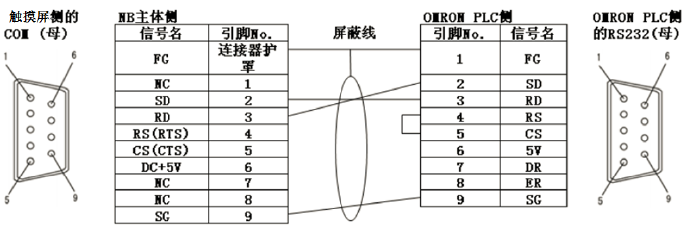
Please use shielded wire when manufacturing communication cables; cover the pins with insulating sleeves during welding to prevent loose connections or short circuits.
(3) Proper Usage of Serial Ports (RS422/RS485)
① The COM2 port of the NB touch screen supports RS485 and RS422 communication functions; the NS series touch screen requires an adapter, CJ1W-CIF11, for RS485 and RS422 communication.
② NB Series Touchscreen Self-Manufactured Communication Cables (COM2).
RS-422 wiring method:

b. RS485 Wiring Method:
To use the RS-485 connection method, simply connect the corresponding PLC side to the 6th and 8th pins as shown in the image above.

c. Use shielded wire when manufacturing communication cables; cover pins with insulating sleeves during welding to prevent loose connections or short circuits.
NS Series Touchscreen Self-Manufactured Communication Cable (CJ1W-CIF11).
Dialing settings for RS422/485 communication:
During RS422 communication, the DIP switch on the CJ1W-CIF11/12 is set to 23, all set to OFF.
During RS485 communication, the DIP switch on CJ1W-CIF11/12 is set to ON for position 23, with all others OFF.
RS422A wiring method:
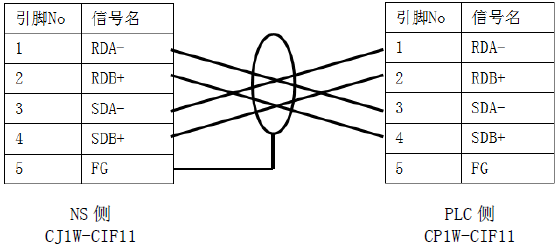
C.RS485 wiring method:
d. Note: When manufacturing communication cables, please be attentive:
When connecting communication cables, ensure the cable is fully inserted into the terminal block and tighten the screws to a torque of 0.28NM. Avoid burrs on the wire ends to prevent short circuits and other malfunctions.
Common Faults When Incorrectly Using Serial Ports
Cable or adapter insertion and removal while in communication state has caused a failure in the touch screen communication port chip.
A wiring error in the cable lines caused a short circuit failure in the port chips.
